
Best Zebra Printers for Conference Badge Printing
The Zebra ZD421 is the best starting point for most four-inch monochrome conference-badge workflows. Choose the ZD621 when you need higher listed print speed or greater performance headroom, and the ZD411 only for narrow labels.
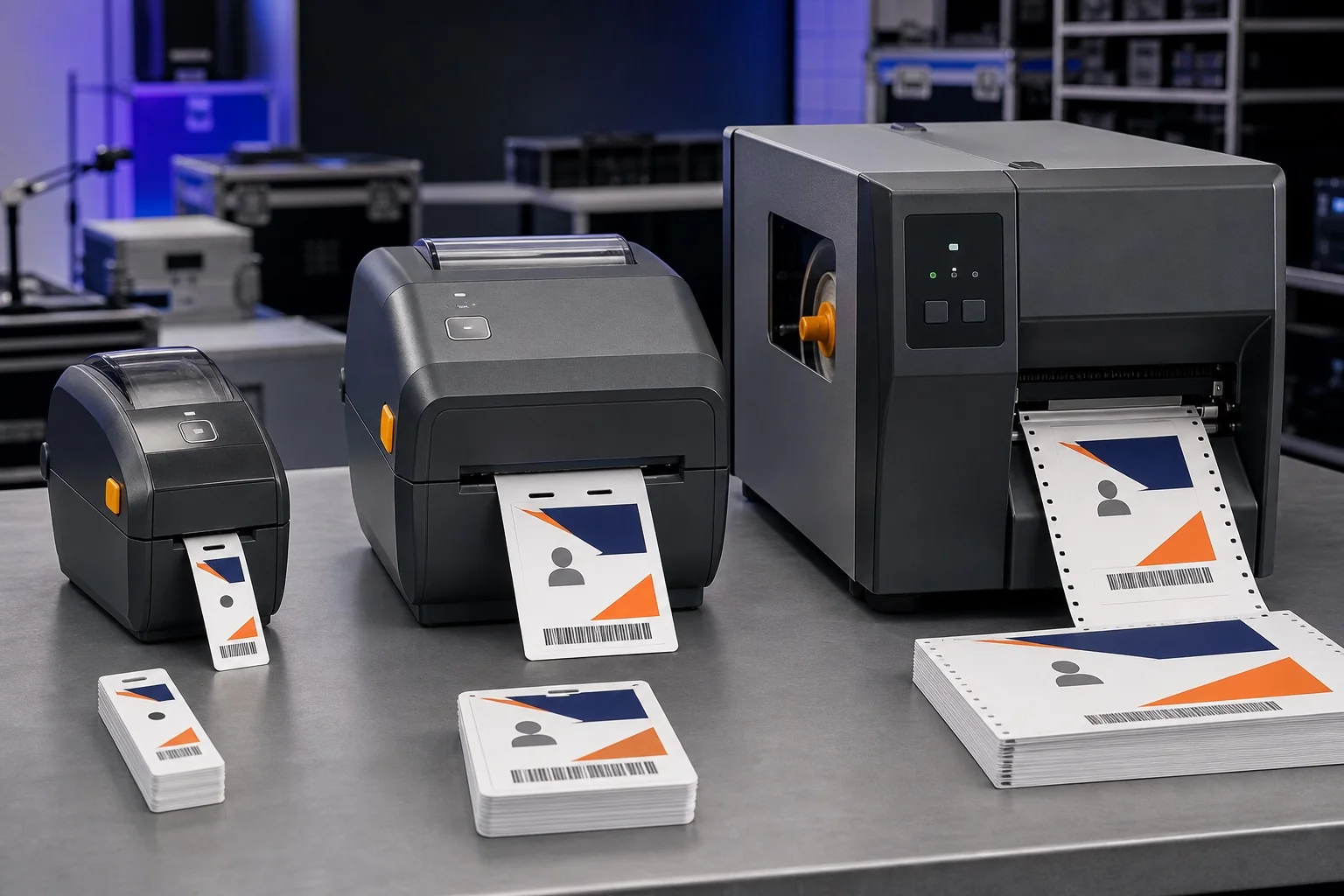
- Best compact: ZD411.
- Best overall four-inch desktop: ZD421.
- Best higher-performance desktop: ZD621.
- Best for supported RFID encoding: ZD621R family.
- Best for central industrial production: an appropriate ZT-series model after duty and media analysis.
Zebra badge printer comparison
| Model | Maximum print width | Maximum listed speed | Best event use | Main limitation |
|---|---|---|---|---|
| ZD411 | 56 mm at 203 dpi; 54 mm at 300 dpi | Model-dependent two-inch class | Visitor and narrow labels | Too narrow for conference passes |
| ZD421 | 104 mm at 203 dpi; about 106 mm at 300 dpi | 152 mm/s at 203 dpi; 102 mm/s at 300 dpi | General four-inch badges | Lower speed tier than ZD621 |
| ZD621 | 104 mm at 203 dpi; about 108 mm at 300 dpi | 203 mm/s at 203 dpi; 152 mm/s at 300 dpi | Higher-demand check-in desks | Higher price tier |
| ZD621R/ZD611R | Four-inch/two-inch RFID variants | Variant dependent | Print and encode supported RFID credentials | Requires RFID software, stock and testing |
| ZT industrial series | Model-dependent four/six-inch classes | Model-dependent | Central production and larger media capacity | Footprint, cost and specialist operation |
ZD411: best for narrow labels
The ZD411 is a two-inch-class desktop printer. It is suitable for temporary visitor labels, narrow attendee identification and category stickers. It is not the right choice for a 4 × 3 or 4 × 6 conference pass.
ZD421: best overall four-inch Zebra
The ZD421 offers direct-thermal and thermal-transfer variants, optional 300 dpi resolution and a listed print width around 104 mm at 203 dpi. That width suits many 4 × 3 and 4 × 6-inch roll formats. Zebra lists up to 152 mm/s at 203 dpi.
Choose ZD421 when
- You need a professional four-inch desktop workflow.
- 203 dpi is sufficient for the design.
- You plan several identical registration stations.
- Budget matters more than the highest engine speed.
- Direct thermal is appropriate for the event lifespan.
ZD621: best higher-performance desktop
The ZD621 remains a four-inch desktop printer but Zebra lists up to 203 mm/s at 203 dpi and up to 152 mm/s at 300 dpi. It can provide more performance headroom, but it cannot solve slow attendee lookup, network latency or holder assembly.
Choose ZD621 when
- The printer runs continuously during a dense arrival window.
- 300 dpi output and higher listed speed are both valuable.
- The event has budget for identical main and spare units.
- You want a higher-tier Zebra desktop platform.
ZD621R: RFID only when the workflow requires it
RFID variants can encode compatible tags while printing. This is relevant for access, tracking or cashless experiences, but requires RFID media, encoding data and an integrated application. BadgeFlow can design visible badge output; it does not encode RFID chips.
ZT industrial printers
Industrial Zebra hardware can support larger rolls, robust construction and sustained central production. It is not automatically better at a front registration desk. Consider industrial models when a central team prints very large batches, media changes are expensive or environmental conditions exceed normal desktop use.
Direct thermal versus thermal transfer
| Factor | Direct thermal | Thermal transfer |
|---|---|---|
| Consumables | Coated thermal stock | Stock plus ribbon |
| Setup | Simpler | More involved |
| Short conference | Usually sufficient | Often unnecessary |
| Durability | Stock dependent | Can be higher |
| Colour | Monochrome | Single ribbon colour |
| Best fit | One-to-several-day badges | Longer-lived staff/exhibitor credentials |
203 dpi versus 300 dpi
Use 203 dpi for large attendee names and properly sized QR codes. Use 300 dpi when the design includes smaller type, dense 1D barcodes or fine graphics. Do not shrink a code because the printer has higher resolution. Physical module and bar width remain essential.
Use the barcode versus QR code guide to choose a format and the badge code printing guide for quiet zones.
Badge-size compatibility
| Format | ZD411 | ZD421/ZD621 |
|---|---|---|
| Narrow visitor label | Good | Fits but larger printer may be unnecessary |
| 4 × 3 in | Too narrow | Good candidate |
| 4 × 6 in | Too narrow | Good candidate at 101.6 mm width |
| A7 | Too narrow across 74 mm | Use 74 mm across printhead |
| A6 | Too narrow | 105 mm can exceed 104 mm on 203 dpi models; 300 dpi variant specifications differ, so test exact model |
| 90 × 60 mm insert | Too wide in 90 mm orientation | Fits |
| Rigid CR80 PVC card | Wrong media path | Use dedicated card printer |
Use the exact badge dimension table and confirm the holder insert and visible window.
Best Zebra by event size
| Event scenario | Recommended starting point | Backup |
|---|---|---|
| Under 100 attendees | Office printer or one ZD421 only if onsite thermal is necessary | Blank manual or sheet fallback |
| 100–500 attendees | One or two ZD421 stations for dynamic badges | One spare or pre-printed batch |
| 500–1,500 attendees | Several identical ZD421 or ZD621 stations | Pre-calibrated spare units |
| 1,500–5,000 attendees | Model from peak throughput; formal station and media plan | Reserve lanes plus offline workflow |
| 5,000+ attendees | Evaluate desktop fleet versus central industrial production | Multiple failure-isolated production paths |
Follow the onsite badge printing capacity guide rather than buying from total attendance alone.
Media and sensor options
- Gap/notch: common die-cut badge stock.
- Black mark: useful when a mark defines each badge pitch.
- Continuous: requires an exact page length and cutting/tearing process.
- Fan-fold: supports external stock and central production.
- Direct thermal: simplest short-event stock.
- Thermal transfer: requires a compatible ribbon.
BadgeFlow workflow
- Prepare the file with bulk badge printing from Excel.
- Set the BadgeFlow badge to the exact stock dimensions.
- Design for monochrome thermal output.
- Export one badge per PDF page.
- Configure media type and dimensions in the Zebra driver.
- Calibrate the stock.
- Print at actual size.
- Scan and holder-test the proof.
Read the full Zebra event badge printing setup guide for calibration and troubleshooting.
Zebra versus Brother QL
Compact Brother QL models suit 62 mm-class labels. Zebra ZD421 and ZD621 suit four-inch professional roll media and offer direct-thermal or thermal-transfer options. The Brother QL-1110NWBc is the closest wide QL comparison.
Zebra versus Epson ColorWorks
Zebra thermal printing is simpler and avoids ink. Epson ColorWorks adds full-colour variable output. Choose colour only when it carries attendee or brand value. Read the ColorWorks event badge guide.
Zebra versus laser printing
Laser is efficient for advance sheets, colour branding and reusable holder inserts. Zebra is better for one badge at a time on roll stock. A hybrid workflow can use both.
Buying checklist
- Choose badge dimensions and orientation.
- Confirm direct thermal or thermal transfer.
- Select 203 or 300 dpi from actual code/text requirements.
- Confirm print width for the exact resolution.
- Choose USB, Ethernet, Wi-Fi or Bluetooth options.
- Order the exact stock and ribbon where required.
- Test gap, notch or black-mark sensing.
- Confirm cutter or tear-off requirements.
- Install current drivers on all laptops.
- Budget for calibrated spares and stock contingency.
- Use the conference badge printing checklist.
Zebra purchasing decision tree
- Is the badge narrower than 56 mm? Evaluate ZD411.
- Does the badge require approximately four-inch print width? Evaluate ZD421 or ZD621.
- Does it need full colour? Use a colour label printer rather than standard Zebra thermal.
- Does it need greater durability? Choose a thermal-transfer variant and validated ribbon/media.
- Does it need RFID encoding? Evaluate an RFID model and integrated software.
- Will one central printer run sustained large batches? Evaluate an industrial ZT model.
- Is 203 dpi sufficient? Prefer the simpler/lower-cost resolution unless tests require 300 dpi.
Connectivity and options
Exact interfaces vary by configuration. Record the full part number and quote. USB is useful for direct fallback; Ethernet supports controlled shared networks; Wi-Fi and Bluetooth add placement flexibility but also troubleshooting variables. Cutter, peeler and display options may be separate.
Sensor and media option scorecard
| Media design | Required feature | Event implication |
|---|---|---|
| Die-cut with gap | Transmissive sensing | Simple badge pitch when gap is clear |
| Black-mark stock | Reflective sensing and correct position | Useful for stock where gap sensing is difficult |
| Continuous roll | Page length plus cutter/tear process | Flexible length but strict driver configuration |
| Fan-fold | Rear feed path and protected supply | Useful for high-capacity central production |
| Thermal-transfer synthetic | Ribbon path and matching consumables | Higher durability and more setup |
| RFID inlay | RFID-capable model, calibrated stock and encoding software | Specialist integrated credential system |
Operational difference between ZD421 and ZD621
The ZD621’s higher maximum speed can reduce engine time, but only when print data, media and quality settings allow it. At a normal attendee lane, the difference may be hidden by the human workflow. At a central print bank producing long batches, the extra performance can be more visible.
Choose ZD621 for a tested capacity need, not only because it is the higher model number.
Example deployments
500-attendee conference
Two ZD421 direct-thermal printers, one active per lane or one spare, can support dynamic badges if timed tests confirm the service cycle. A hybrid advance batch may require only one exception printer.
2,000-attendee exhibition
Use several identical ZD421 or ZD621 units, Ethernet or controlled local network, central stock management and separate exhibitor exceptions. Keep at least one calibrated spare for each failure domain.
Central print room
A ZT industrial model may reduce media changes and support sustained output. The registration desk can then collect or route completed badges. Design the handoff so a printed badge is not separated from its attendee record.
Staff RFID credential
Use an RFID model only with a complete encoding and validation workflow. Print a visible ID and provide a process to disable lost credentials.
Maintenance and printhead protection
- Use approved cleaning materials.
- Clean after contaminated or adhesive stock.
- Avoid touching the printhead surface.
- Inspect for a persistent white line across output.
- Store media sealed and dust-free.
- Use ribbon wider than the printed area where required to protect the head.
- Check cutter debris and platen condition.
Procurement and rental questions
- Exact model, part number and resolution
- Direct-thermal or thermal-transfer configuration
- Installed Ethernet, Wi-Fi, Bluetooth, cutter or peeler
- Media and ribbon product codes
- Driver and Zebra utility versions
- Spare printers and replacement response
- Calibration before delivery
- Onsite technician availability
- Proof test using the BadgeFlow PDF
Fleet standardisation
Do not mix 203 and 300 dpi queues without a documented reason. Use identical stock and printer configurations in normal lanes. Keep special RFID or colour processes isolated so operators cannot send a standard attendee badge to the wrong device.
Model evaluation scorecard
| Criterion | ZD411 | ZD421 | ZD621 | ZT industrial |
|---|---|---|---|---|
| Narrow desk footprint | Excellent | Good | Good | Low |
| Four-inch badge fit | No | Yes | Yes | Model dependent |
| Higher listed speed | Low/medium | Medium | High | High/model dependent |
| Registration-lane suitability | Narrow labels | Excellent | Excellent | Usually central |
| Large roll capacity | Limited | Desktop | Desktop | Strong |
| Cost and simplicity | Strong | Balanced | Higher tier | Highest complexity |
| RFID availability | ZD611R family rather than standard ZD411 | No standard ZD421 focus | ZD621R available | Model dependent |
203 dpi and 300 dpi badge examples
203 dpi design
Use a large attendee name, clear organisation, explicit role text and a QR code with generous modules. This is sufficient for many conference passes and preserves the higher listed engine speed.
300 dpi design
Use when the badge genuinely requires smaller text, a dense one-dimensional barcode or finer graphics. Keep the main name large. Test whether the extra detail remains visible through the holder.
Direct-thermal or thermal-transfer purchasing test
- How long must the credential last?
- Will it face heat, sunlight, rubbing or chemicals?
- Is the event prepared to manage ribbons?
- Does the stock supplier approve a ribbon combination?
- Can direct thermal pass a real wear test?
If direct thermal passes, its simpler operation may be preferable. Choose thermal transfer for a demonstrated durability requirement.
Fleet planning
Use identical normal-lane printers where possible. A mixed fleet requires separate drivers, stock, calibration and spares. Keep special devices—RFID, 300 dpi or thermal transfer—at clearly labelled stations.
| Fleet size | Suggested control |
|---|---|
| 1–2 printers | Identical spare or tested alternate process |
| 3–6 printers | One golden station, shared stock and technical lead |
| 7–15 printers | Numbered queues, central supply, reserve units and station map |
| 15+ printers | Formal configuration management, imaging and fault inventory |
Total cost questions
- Direct-thermal versus thermal-transfer purchase price
- 203 versus 300 dpi model cost
- Ethernet/Wi-Fi option cost
- Cutter or peeler option
- Media and ribbon per badge
- Spare ratio
- Cleaning and printhead service
- Rental support and shipping
- Operator and technician labour
Vendor proof requirements
Ask the supplier to print a provided BadgeFlow PDF containing realistic names and codes on the proposed stock. Require a physical sample or video showing page size, media feed and cut/tear result. A generic shipping label demonstration is not proof of the badge workflow.
Final Zebra procurement checklist
- Model family and full part number
- 203 or 300 dpi
- Direct thermal or thermal transfer
- Maximum print width for that model
- Connectivity options installed
- Sensor and media compatibility
- Cutter/peeler/tear mode
- Stock and ribbon availability
- Physical BadgeFlow proof
- Configured spare and support plan
Frequently asked questions
Which Zebra printer is best for conference badges?
The ZD421 is the balanced general-purpose four-inch desktop model. Choose ZD621 when higher performance, a premium interface or more headroom matters.
What is the best compact Zebra badge printer?
The ZD411 is the compact two-inch-class option, suitable for narrow visitor labels rather than conventional four-inch conference passes.
Should I buy a 203 dpi or 300 dpi Zebra?
Choose 203 dpi for large names and well-sized QR codes. Choose 300 dpi for smaller text, dense barcodes or detailed graphics, then test the final badge.
Is the ZD621 twice as fast as the ZD421?
No. Zebra lists higher maximum speeds for the ZD621, but actual event throughput depends on the complete check-in process.
Do I need thermal transfer for conferences?
Usually not for a short indoor event. Direct thermal is simpler. Choose thermal transfer for more durable credentials and when a matched ribbon-media workflow is justified.
Can a Zebra printer create colour-coded badges?
Standard desktop thermal models do not print full colour. Use pre-printed colour shells, coloured stock or a colour label printer.
What is a Zebra RFID badge printer?
ZD621R and related RFID variants can print and encode supported RFID media. This requires compatible stock and software; BadgeFlow does not perform RFID encoding.
Is an industrial Zebra printer necessary for 5,000 attendees?
Not necessarily. Several identical desktop stations can be resilient. Industrial hardware becomes relevant for central production, large rolls or sustained duty, but operational architecture matters more than one model.
Official Zebra references
Zebra, ZD421, ZD621 and ZPL are trademarks of Zebra Technologies. BadgeFlow is not affiliated with, tested by or endorsed by Zebra Technologies.