
What Paper or Cardstock Works Best for Badge Printing?
The best badge stock is the one that fits the holder, feeds reliably through your printer, remains readable for the event duration and supports any QR codes or barcodes you need to scan.
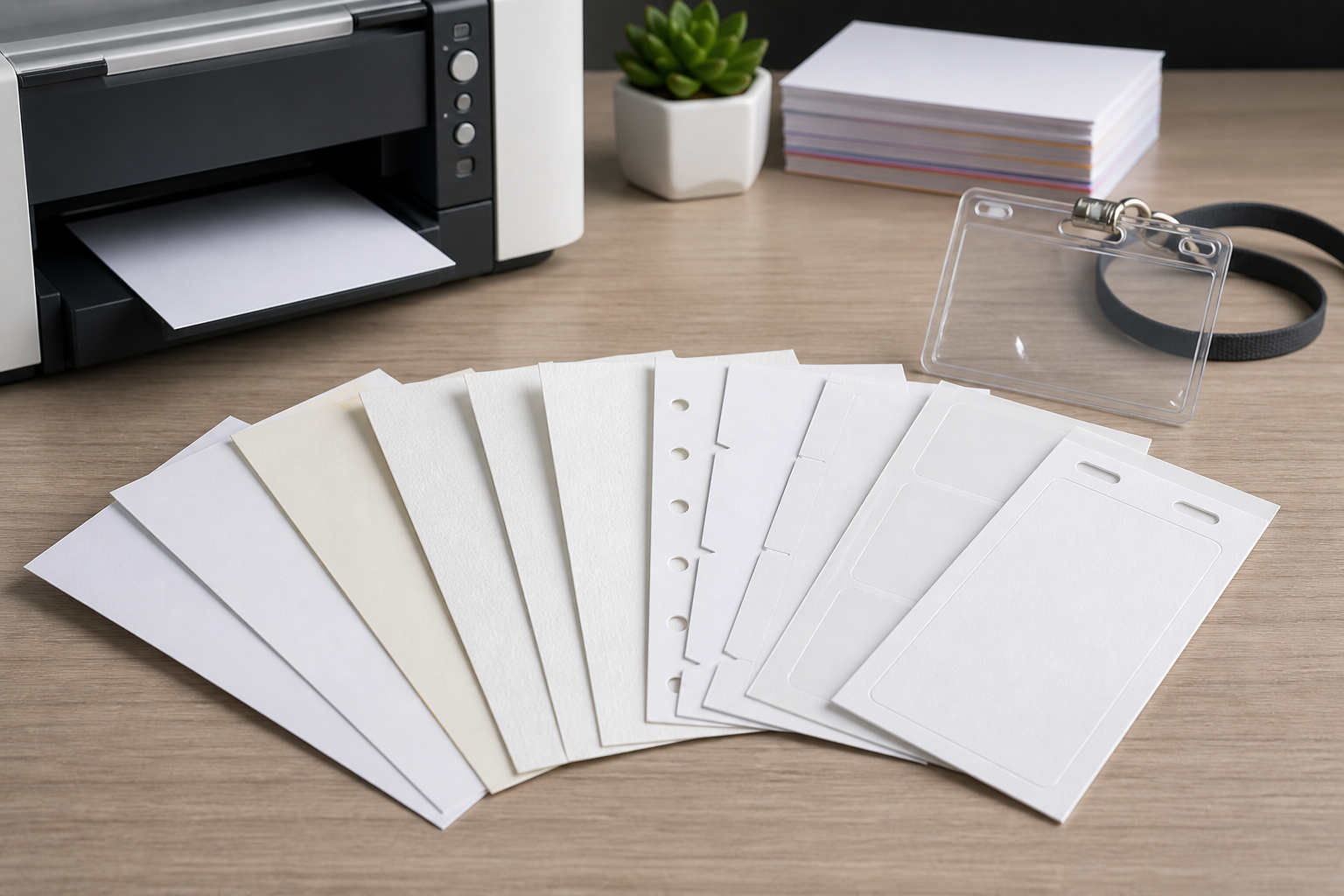
Important Printer support varies by model. Check the printer manual for accepted media size, weight, coating and feed path before buying stock in bulk.
Quick recommendations by event type
| Event | Practical starting point | Why |
|---|---|---|
| One-day networking event | Adhesive name-badge sheets or lightweight holder inserts | Fast distribution and limited durability requirements. |
| Multi-day conference | Medium card insert inside a reusable holder, or purpose-made badge stock | Better stiffness and protection from repeated handling. |
| Workshop or classroom | Adhesive badges or simple paper inserts | Low setup and easy personalisation. |
| Outdoor event | Protected insert or specialist weather-resistant material | Ordinary paper is vulnerable to moisture and abrasion. |
| Badge with frequently scanned code | Flat, high-contrast matte print surface with a clear holder | Reduces avoidable glare and distortion. |
Standard office paper
Ordinary copier paper is inexpensive and feeds easily through most printers. It can work for short events when placed in a holder, especially if badges are collected and inserted by staff.
Its limitations are stiffness and durability. A thin insert may curl, slide inside an oversized pocket or look less polished. It can also show the holder’s backing or any print from the reverse side.
Lightweight and medium cardstock
Cardstock gives inserts more body and makes them easier to handle. It is often a good choice for conferences when the badge will be placed inside a clear holder. The correct weight depends on the printer and holder rather than a single universal number.
- Check whether the printer has a straight or rear feed path.
- Confirm the supported media weight in the manual.
- Use the correct paper-type setting so the printer adjusts feed and heat.
- Test duplex printing separately; heavier stock may behave differently when turned.
Heavy cardstock
Heavy stock can be useful for standalone passes or pre-punched badges, but it creates more feed risk. A desktop printer may jam, curl the material or leave toner poorly fused if the media is outside its specification.
Do not choose stock solely because it feels premium. A slightly lighter card that prints reliably and sits correctly in the holder is better than a heavy sheet that causes failures during a 1,000-badge run.
Perforated badge sheets
Perforated sheets contain multiple inserts that can be separated after printing. They reduce manual cutting and produce consistent finished dimensions. They are particularly useful for reusable holders.
Check:
- the exact product code and sheet layout;
- whether the stock is A4 or US Letter;
- the number and orientation of inserts per sheet;
- the supported printer type;
- whether printing is intended on one or both sides.
The Avery-compatible badge template guide explains how product codes relate to badge size and sheet layout.
Adhesive name-badge sheets
Adhesive badges remove the need for holders and are convenient for short events. They are common at workshops, meetups and visitor sessions.
Use products designed for clothing and follow the manufacturer’s guidance. Some adhesives are unsuitable for delicate fabrics. Verify whether the material supports inkjet, laser or both; coatings and adhesives can react differently to heat.
Badge-holder inserts
For a holder, match the insert size, not the holder’s outside measurement. A holder sold as 90 × 60 mm may use a smaller visible window or a differently sized insert. Measure an existing insert or use the supplier’s internal-dimension specification.
See the conference badge dimensions guide and the dedicated badge-holder size guide in this content set.
Pre-cut or pre-punched stock
Pre-cut cards and fanfold stock are often associated with specialist badge printers. They can support quick single-badge output, but the stock, printer driver and hardware must be compatible. BadgeFlow can generate a PDF for a chosen format; it does not provide a live automatic print queue.
GSM, thickness and stiffness
GSM means grams per square metre. It describes mass per area, not stiffness by itself. Two papers with the same GSM can feel different because of fibre, coating and caliper. US “lb” paper ratings also vary by paper category, so a simple one-number conversion can be misleading.
When comparing products, look for:
- GSM or basis weight
- caliper or thickness
- printer compatibility
- coating and finish
- grain direction
- holder compatibility
Inkjet versus laser printing
| Factor | Inkjet | Laser |
|---|---|---|
| Media | Needs an ink-receptive surface. | Must tolerate heat and toner fusing. |
| Drying | Allow ink to dry before stacking or inserting. | Output is usually immediately dry, but unsuitable coatings can cause adhesion problems. |
| Heavy stock | Support depends on feed path and model. | Support depends on media setting, heat and feed path. |
| Photos | Can produce strong photo output on suitable media. | Often efficient for high-volume text and graphics. |
Matte versus glossy surfaces
Matte stock is a safe default for text-heavy badges and codes because it tends to reduce reflections. Glossy stock can make colour and photography look vivid, but glare from lighting or a clear holder may affect readability and scanning.
A glossy badge is not automatically unscannable. Test the complete combination: printed code, holder, venue lighting and scanner.
QR-code and barcode considerations
- Use dark code modules on a light, plain background.
- Keep adequate blank space around the code.
- Avoid folds, perforations, holes and holder seams.
- Do not laminate over a code without testing the resulting reflections.
- Scan samples printed from every printer that will be used.
Read QR codes on conference badges for a full implementation guide.
A4 versus US Letter
A4 and Letter are different sizes. A template designed for one will not necessarily align on the other. Match the PDF page size to the physical sheet and print at actual size. Do not allow the print dialog to “fit” or scale the page unless the product instructions explicitly require it.
Paper-selection matrix
| Material | Advantages | Risks | Best fit |
|---|---|---|---|
| Office paper | Cheap, easy to feed | Flexible, less durable | Short event inside a holder |
| Medium card | Stiff, professional | Printer support varies | Conference holder inserts |
| Heavy card | Durable, standalone feel | Jams and curl if unsupported | Pre-punched or specialist workflows |
| Perforated sheets | Consistent size, less cutting | Requires exact template alignment | Bulk insert production |
| Adhesive sheets | No holder required | Fabric and printer limitations | One-day events and visitors |
Test-print procedure
- Confirm the exact badge and sheet dimensions.
- Check the printer’s media specification.
- Load a small quantity using the recommended tray.
- Print at actual size.
- Check registration at every edge of the sheet.
- Separate or cut one badge.
- Insert it into the real holder or apply it to a test fabric.
- Scan every code under representative lighting.
- Run several sheets to check feed consistency.
For cost and workflow comparisons, see printing event badges on a budget, onsite badge printing and the conference printing checklist.
Paper grain, curl and duplex printing
Paper fibres tend to align in a grain direction during manufacturing. Grain, moisture and printer heat can affect curl. This matters when inserts must lie flat in a clear pocket or when a QR code is scanned through plastic.
Duplex printing adds another variable because the sheet passes through the printer twice or is turned automatically. Test front-to-back alignment, curl and toner or ink set-off. When double-sided precision is important, ask the print provider for the expected registration tolerance.
Environment and storage
Paper absorbs moisture from the environment. Stock stored in a cold warehouse, humid room or open package can feed differently from a fresh test sheet. Keep material flat, sealed and conditioned in the printing room before a large run. Follow the manufacturer’s storage guidance.
- Do not place open stock directly beside heating or air-conditioning vents.
- Keep partially used sheets protected from dust and curled corners.
- Store printed badges flat until cutting or insertion.
- Allow inkjet output to dry before stacking tightly.
Cutting, perforation and finishing
Plain sheets require accurate cutting. A guillotine or rotary trimmer is generally more consistent than scissors for volume production. Include safe margins so small cutting variation does not remove text or code quiet zones.
For perforated sheets, fold and separate them according to the product instructions. Rough tearing can leave fibres or distorted edges that make an insert difficult to place in its holder. Pre-punched stock should be tested for lanyard balance and tear resistance.
Procurement checklist
- Get the exact printer model and supported media specification.
- Confirm A4, Letter or custom page size.
- Confirm finished badge dimensions and holder fit.
- Choose insert, adhesive, pre-cut or specialist stock.
- Check inkjet, laser or specialist-printer compatibility.
- Order enough material for proofs, waste and reprints.
- Request a small sample before a large purchase.
- Test under realistic venue lighting and handling.
- Record the successful printer settings for the production team.
Example selections
Internal training day: removable adhesive badges may be the simplest solution if the fabric guidance is acceptable. Three-day conference: medium card inside a reusable holder provides better durability. High-volume onsite reprints: compatible pre-cut or purpose-made stock may reduce finishing time, but requires a tested printer workflow. Outdoor festival accreditation: ordinary paper may need a sealed holder or a more durable specialist material.
Frequently asked questions
What paper should I use for conference badges?
For holder inserts, use paper or card that matches the holder and printer specifications. For a one-day event, a lighter insert may be sufficient; multi-day badges usually benefit from more stiffness or a protective holder.
Is cardstock better than ordinary paper for name badges?
Cardstock is usually stiffer and easier to handle, but heavier is not automatically better. Some office printers cannot feed heavy stock reliably, especially through a curved paper path.
Do QR codes scan better on matte paper?
Matte surfaces generally reduce reflections, but scanning also depends on code size, contrast, print quality, holder glare, lighting and the scanning device. Always test the complete badge assembly.
Can I print badge cardstock with a home or office printer?
Often yes, provided the printer supports the stock’s size, weight, coating and feed path. Check the printer manual rather than relying on a universal GSM recommendation.
What is the difference between GSM and lb paper weight?
GSM measures grams per square metre. US pound ratings depend on paper category and are not a direct universal conversion. Compare the manufacturer’s exact specification and thickness where possible.